Vimeo bandwidth limit: what are the costs and what should I do if I exceed 2 TB?


If you got here, you probably received an email from Vimeo with a message similar to this: Your account has reached the monthly bandwidth limit of 2 TB.
Vimeo’s bandwidth limit is exactly what triggers this notice, and it usually comes with a short deadline to respond. The immediate feeling is urgency, especially when your videos are running on sales pages, membership areas, or lessons.
This guide answers, in order, the three questions you probably have right now: what this message means, how much it can actually cost, and what options you have in this situation.

What is Vimeo’s 2 TB bandwidth limit, and why do so few people know it exists?
Bandwidth is the amount of data your videos consume when they are watched. Every time someone presses play, loads the player, or watches part of a video, bandwidth is consumed.
The more people watch, and the higher the quality, the more bandwidth is used.
Bandwidth is not storage: the difference that billing mixes up
Many people confuse the two concepts, and that confusion is what catches users off guard:
Storage: this is the space your files take up. A 2 GB video takes up 2 GB, whether nobody watches it or one million people do.
Bandwidth: this is the consumption generated by views. That same 2 GB video, watched one thousand times, can generate terabytes of traffic.
Bandwidth grows along with your success, but for those using Vimeo, this creates a risk due to the platform’s billing model. The more your content is watched, the closer you get to the limit, and the consequence can be paying much more for your videos to keep playing.
Real cases reported by creators
In March 2022, a wave of Vimeo ultimatums became news in technology media. The Verge published a report about creators who were told to pay thousands of dollars or leave the platform.
According to press coverage at the time, some cases involved creators who were paying a few hundred dollars per year and received proposals in the thousands, with short deadlines to close a contract.
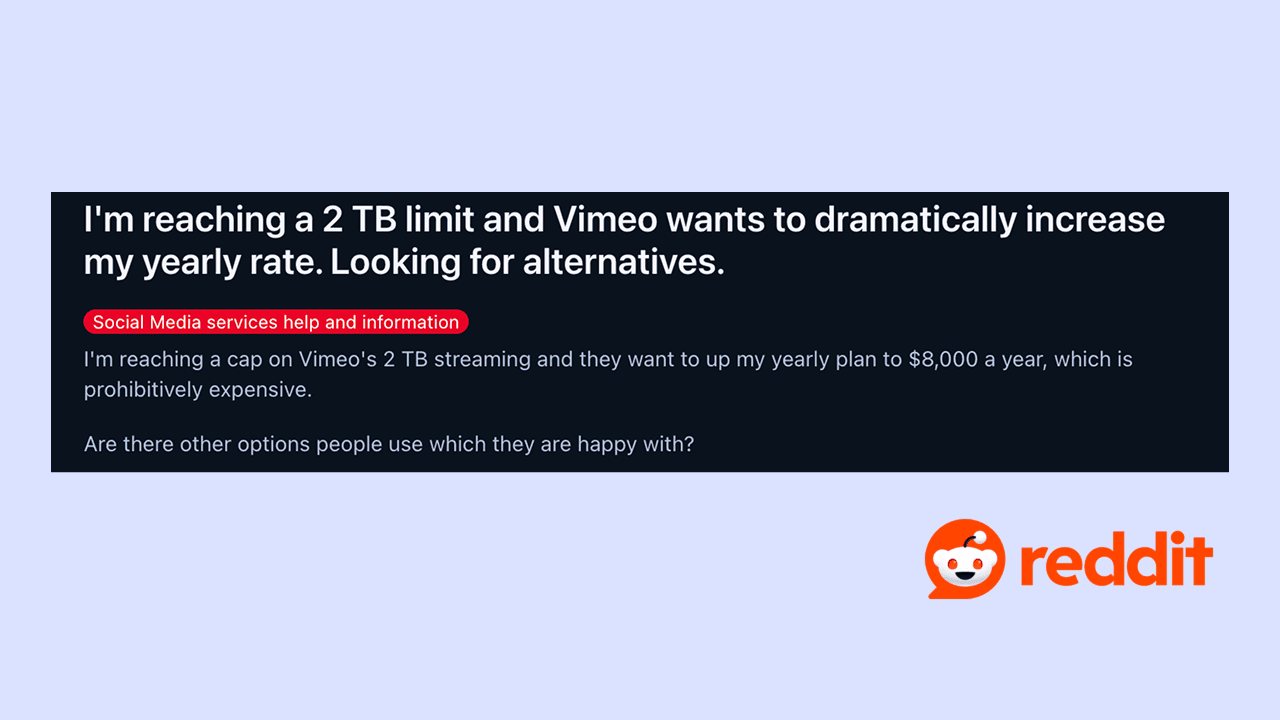
In video creator forums, such as Reddit, it is easy to find similar reports from users who left Vimeo because they felt the service was too expensive for what it delivered. What stands out in these comments is that many users say they did not know billing could change so much after 2 TB, and conclude that the best option is to look for another platform before hitting the limit.
The two triggers that put your account on the radar
According to Vimeo’s own help center, the sales team contacts you when your account crosses one of these two limits:
Trigger 1: exceeding 2 TB per month at least two times in the past 12 months
Trigger 2: exceeding 10 TB per month one time in the past 12 months. A strong launch, a viral video, or a successful traffic campaign can trigger this on its own
It is worth reinforcing a point that often surprises people: this 2 TB limit applies to all Vimeo self-service plans, including the most expensive ones. Subscribing to a higher plan does not increase the bandwidth cap. Only Enterprise or Custom plans have a negotiated allowance.
I exceeded the limit. Now what?
Here, it is important to separate documented facts from rumors. The good news is that exceeding the limit does not delete your videos. The bad news is that it can take them offline temporarily if you do not respond in time.
The real deadline: 7 days to respond
Vimeo’s help center is clear on this point. After the team’s initial contact, you have seven days to respond and reach a resolution. During this period, nothing changes in your account.
There is one relevant change worth noting: in 2022, Vimeo publicly promised a minimum deadline of 30 days. The current policy, in the active help center, sets the deadline at seven days. If the deadline has become tighter, planning ahead has become even more important.
Solve the root cause, not the deadline. A platform with predictable billing prevents this notice from coming back. Explore Panda Video’s plans.
What happens if you ignore the notice
If you do not respond or do not reach an agreement within seven days, the same official page explains that the account is at risk of temporary suspension. This means that:
Your videos stop playing anywhere they are embedded, such as your website, membership area, or course platform.
You still have access to the files, meaning the content is not deleted.
The suspension is reversible as soon as you respond and resolve the situation.
The sensitive point is that the block affects the player everywhere at once. If your business depends on those videos running, even a few hours offline can mean lost sales or students without access.
In this case, you will need to analyze a few alternatives: reduce bandwidth consumption, take the risk of paying more for Enterprise or Custom, or migrate your library to another platform that fits your needs.
It is important to highlight that the real cost of Vimeo Enterprise is usually the point that defines the decision, and the honest answer is that there is no public list price. The plan is negotiated case by case, which makes planning difficult and leaves those who received the notice without knowing in advance how much more they will have to pay.
Why Vimeo’s cost is unpredictable
In addition to taking your videos offline, Vimeo’s bandwidth limit creates a second problem: the cost of continuing.
Recent cases show that some creators were suddenly reclassified as Enterprise customers, even while running small businesses [Reddit]. One of these creators, in the coaching industry, reported being pushed into a US$ 5,400 per year plan, with the amount almost charged automatically, while their videos, embedded in sales funnels, were inaccessible.
Although the Enterprise plan does not have a public list price, the market is often quoted between US$ 3,500 and US$ 15,000 per year, plus an additional charge per GB that exceeds the allowance, usually around US$ 0.05 to US$ 0.08 per GB.
For those who were paying between US$ 200 and US$ 900 per year on a standard plan, the price can suddenly become much higher. And since overage billing continues, the same unpredictability that generated the notice remains.
How to migrate your videos without losing links or quality
A sharp price increase is one of the biggest reasons people leave Vimeo. In addition to that, the other reason is the fear of breaking everything, meaning the videos that are already embedded across several pages. And the idea of replacing link by link manually can feel overwhelming.
This is where a platform built for this scenario makes a difference. Panda Video, for example, offers assisted content migration and a more predictable billing model, without the bandwidth overage mechanism that generates surprise invoices. In practice, the points that usually matter most in a migration are:
Cost predictability: so you do not receive an unexpected charge during a launch.
Assisted migration: with support to transfer your library without having to redo every embed manually.
Player and delivery: compatible with what you were already using, so you do not lose quality or break the viewer experience.
Content protection features: important for those who work with courses and paid materials.
If you decide to migrate, the most important thing is to choose a platform whose billing model does not recreate the same problem you are trying to solve.
Conclusion
Vimeo’s bandwidth limit notice usually arrives at the worst possible moment: exactly when your content is being watched the most. A billing model that punishes growth puts you in the position of hoping your content is not watched too much, which is the opposite of what any business wants.
What matters most, in the end, is having a service that gives you predictability. That is why migrating to a platform with predictable costs and no bandwidth overage mechanism solves the problem at the root, instead of just postponing the next surprise invoice.
If you received the notice now, the priority is to respond to Vimeo within seven days to keep everything online while you calmly evaluate your options. And if you decide to migrate, Panda Video offers assisted migration for your library, with support to transfer your videos without breaking the links you already published. Talk to Panda Video and see how to leave Vimeo without the headache.
Frequently asked questions
Does Vimeo block my videos if I exceed 2 TB?
Not immediately. You receive a notice and have seven days to respond. If you ignore the deadline, the account is at risk of temporary suspension, and then the videos stop playing where they are embedded. Access to the files is maintained, and the suspension is reversible once you respond.
How much time does Vimeo give me to decide?
Seven days from the initial contact, according to the current help center.
Is there an alternative to Vimeo without per-GB bandwidth charges?
Yes. There are platforms with different billing models, without the bandwidth overage mechanism that generates surprise invoices. The important thing is to confirm how each one charges before migrating, so you do not replace one problem with a similar one.
How can I migrate from Vimeo without losing the links already published for my videos?
At Panda Video, we offer assisted migration, with support to transfer your library and update embeds in an organized way, instead of manually redoing each page. Get in touch with us.