Spending over US$ 200 per month on video hosting?
See the best offer of the year
Spending over US$ 200 per month on video hosting?
See the best offer of the year
Spending over US$ 200 per month on video hosting?
See the best offer of the year

Edit your videos without leaving Panda Video
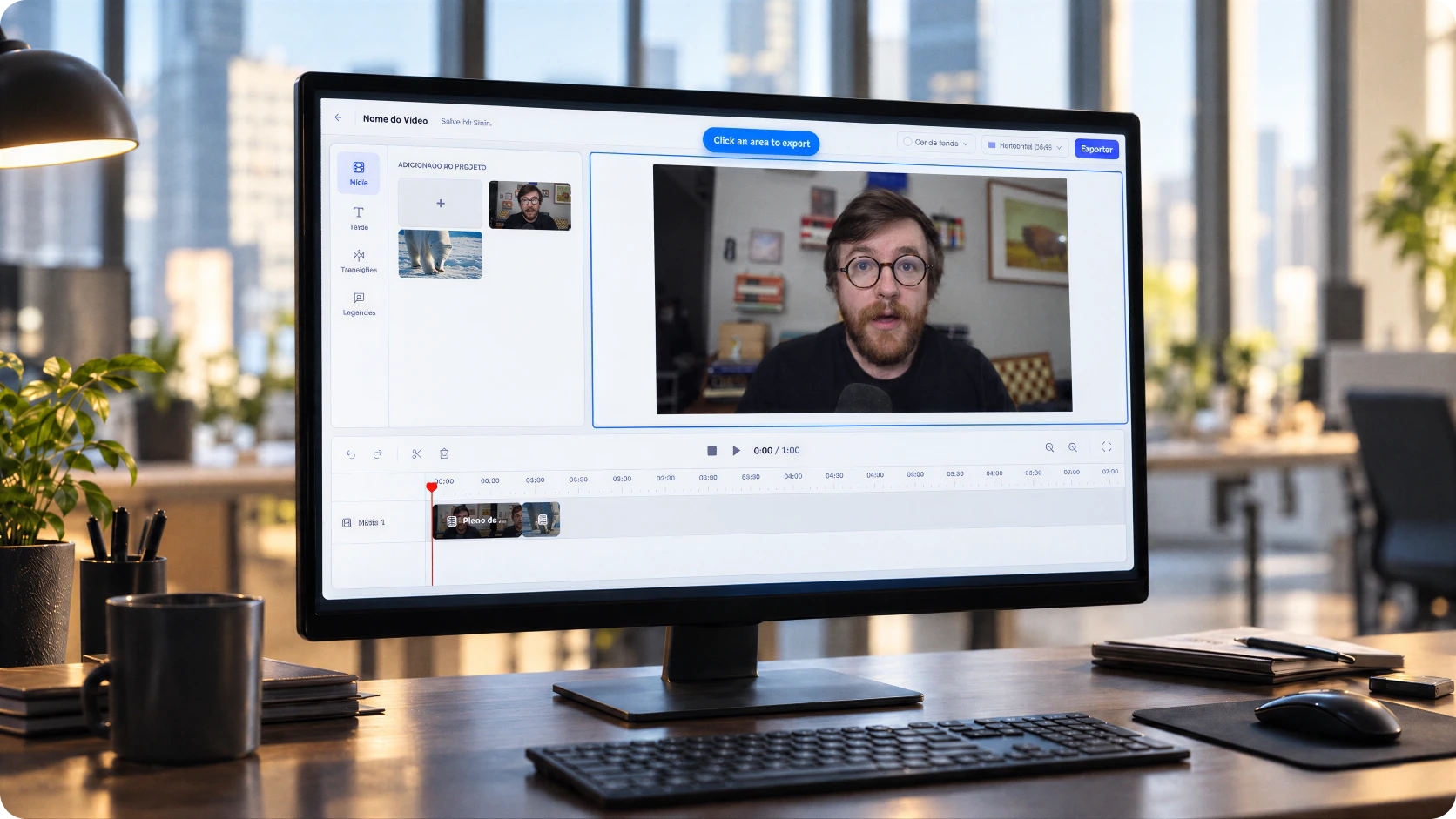
Make cuts, add subtitles, and apply transitions right where your video is already hosted.
+30.000 customers
Between content creators, companies, and e-learning
+30 features
To increase engagement and sales in videos
+2 million
Videos hosted on the platform

Edit your videos without leaving Panda Video
Make cuts, add subtitles, and apply transitions right where your video is already hosted.
+30.000 customers
Between content creators, companies, and e-learning
+30 features
To increase engagement and sales in videos
+2 million
Videos hosted on the platform
Edit your videos without leaving Panda Video
Make cuts, add subtitles, and apply transitions right where your video is already hosted.
+30.000 customers
Between content creators, companies, and e-learning
+30 features
To increase engagement and sales in videos
+2 million
Videos hosted on the platform


Editing
Video hosting and editing in one place
Cut, text, images, and subtitles
All your most common everyday video edits are right here.
Reframing
Turn horizontal videos into vertical ones. Transform your lessons into content for social media.
Editing saves itself
Each edit becomes a project saved in your folder. And because the video is processed on our servers, you can close the tab and track its progress from the dashboard.
Editing
Video hosting and editing in one place
Cut, text, images, and subtitles
All your most common everyday video edits are right here.
Reframing
Turn horizontal videos into vertical ones. Transform your lessons into content for social media.
Editing saves itself
Each edit becomes a project saved in your folder. And because the video is processed on our servers, you can close the tab and track its progress from the dashboard.
Editing
Video hosting and editing in one place
Cut, text, images, and subtitles
All your most common everyday video edits are right here.
Reframing
Turn horizontal videos into vertical ones. Transform your lessons into content for social media.
Editing saves itself
Each edit becomes a project saved in your folder. And because the video is processed on our servers, you can close the tab and track its progress from the dashboard.


Preserved link
Update lessons without changing the link
Saved over the original? Your published links automatically display the edited version. No need to replace files in your membership area or update pages one by one. If you prefer, save it as a new video or download the file.
Preserved link
Update lessons without changing the link
Saved over the original? Your published links automatically display the edited version. No need to replace files in your membership area or update pages one by one. If you prefer, save it as a new video or download the file.
Preserved link
Update lessons without changing the link
Saved over the original? Your published links automatically display the edited version. No need to replace files in your membership area or update pages one by one. If you prefer, save it as a new video or download the file.
BENEFITS
Video editing just got easier

SPEED
Fix published videos in minutes
Found a mistake in a video that's already live? Cut that section and save over the original without having to upload it again.
SIMPLICITY
Cut out extra editing steps
No more downloading videos, sending them to someone for editing, and waiting for a new file. You can handle everything right inside Panda Video.

ORGANIZATION
No more scattered versions
Keep your entire workflow in Panda. No more lost files on your computer, like the infamous lesson-final-v3-this-time-for-real.mp4.
BENEFITS
Video editing just got easier
SPEED
Fix published videos in minutes
Found a mistake in a video that's already live? Cut that section and save over the original without having to upload it again.
SIMPLICITY
Cut out extra editing steps
No more downloading videos, sending them to someone for editing, and waiting for a new file. You can handle everything right inside Panda Video.
ORGANIZATION
No more scattered versions
Keep your entire workflow in Panda. No more lost files on your computer, like the infamous lesson-final-v3-this-time-for-real.mp4.
BENEFITS
Video editing just got easier
SPEED
Fix published videos in minutes
Found a mistake in a video that's already live? Cut that section and save over the original without having to upload it again.
SIMPLICITY
Cut out extra editing steps
No more downloading videos, sending them to someone for editing, and waiting for a new file. You can handle everything right inside Panda Video.
ORGANIZATION
No more scattered versions
Keep your entire workflow in Panda. No more lost files on your computer, like the infamous lesson-final-v3-this-time-for-real.mp4.

Ask your questions
Frequently Asked Questions
Don't leave the page with any questions. See the answers to the most common questions from those interested in migrating to Panda Video.
What can I do with the Video Editor?
Cut sections, add text, images, and subtitles, switch between horizontal and vertical formats, choose a background color, and use files from your computer.
Where can I find the Video Editor?
In the dashboard's sidebar menu, under Studio. You can also open the editor directly from a video.
What happens to the edited video's links?
If you save over the original, your published links automatically display the edited version. You can also save it as a new video or download the file.
Do I need to keep the tab open during processing?
No. The final video is processed on our servers, so you can close the tab and track its progress from the dashboard.
Are my edits saved?
Yes. Each edit becomes a project automatically saved in your folder. You can reopen it whenever you want.
Which plans include the Video Editor?
The Video Editor is included in the Gold and Enterprise plans.
Ask your questions
Frequently Asked Questions
Don't leave the page with any questions. See the answers to the most common questions from those interested in migrating to Panda Video.
What can I do with the Video Editor?
Cut sections, add text, images, and subtitles, switch between horizontal and vertical formats, choose a background color, and use files from your computer.
Where can I find the Video Editor?
In the dashboard's sidebar menu, under Studio. You can also open the editor directly from a video.
What happens to the edited video's links?
If you save over the original, your published links automatically display the edited version. You can also save it as a new video or download the file.
Do I need to keep the tab open during processing?
No. The final video is processed on our servers, so you can close the tab and track its progress from the dashboard.
Are my edits saved?
Yes. Each edit becomes a project automatically saved in your folder. You can reopen it whenever you want.
Which plans include the Video Editor?
The Video Editor is included in the Gold and Enterprise plans.
Ask your questions
Frequently Asked Questions
Don't leave the page with any questions. See the answers to the most common questions from those interested in migrating to Panda Video.
What can I do with the Video Editor?
Cut sections, add text, images, and subtitles, switch between horizontal and vertical formats, choose a background color, and use files from your computer.
Where can I find the Video Editor?
In the dashboard's sidebar menu, under Studio. You can also open the editor directly from a video.
What happens to the edited video's links?
If you save over the original, your published links automatically display the edited version. You can also save it as a new video or download the file.
Do I need to keep the tab open during processing?
No. The final video is processed on our servers, so you can close the tab and track its progress from the dashboard.
Are my edits saved?
Yes. Each edit becomes a project automatically saved in your folder. You can reopen it whenever you want.
Which plans include the Video Editor?
The Video Editor is included in the Gold and Enterprise plans.